
AI Dorm Room Designer: Design Your Dorm From One Photo (2026)
An AI dorm room designer takes a photo of your actual dorm and shows it redesigned: new bedding, rug, lighting, wall colour and decor, placed in your real room instead of a stock photo. With Casavista Dremiai you take one photo, make five quick choices and get a photorealistic render in about 60 seconds, with a before and after slider.
That matters more in a dorm than anywhere else. You often see the room for the first time on move-in day, the budget is small, and returning a rug that turned out the wrong size is a real hassle. Testing the look first is cheaper than guessing.
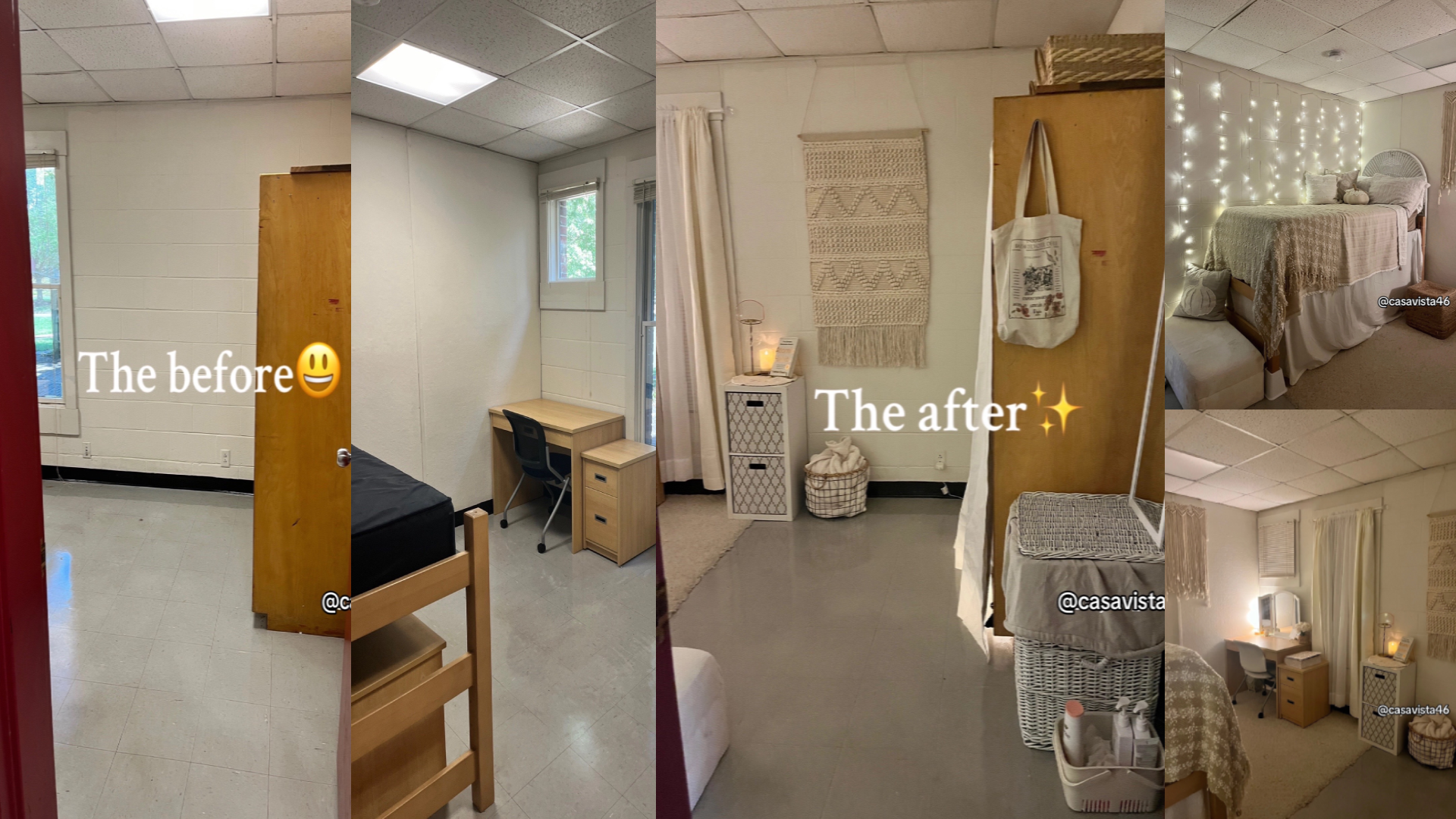
How to design your dorm room with AI in 4 steps
- Take one photo from the doorway corner. Hold the phone at chest height in landscape, lights on, and get the bed and at least one full wall in frame. The more of the floor the AI can see, the better it judges rug and furniture scale.
- Choose the room type and a style. Pick bedroom or dorm, then a style such as Clean Girl, Blushcore, Dark Academia or Japandi.
- Make five choices. Walls, bed, floor, lighting and one finishing touch. In a dorm, treat “walls” as removable wallpaper or a tapestry, since most halls do not allow paint.
- Compare before and after. Drag the slider, save the version you like, and use it as your shopping list before you buy anything.
What an AI dorm designer can and cannot do
It is good at testing colour, bedding, rug size, lighting mood and decor on your real room, and at showing whether a style looks calm or cluttered at this size. It is the fastest way to compare three looks before spending money.
It cannot measure your room or move furniture the school has fixed in place. Use the render to decide the look, then use a tape measure for anything you buy: bed height, desk width and rug size.
Dorm design rules a designer would follow
- Plan for your half, not the whole room. A typical US double is about 12 x 19 ft (3.7 x 5.8 m), so your side is roughly 110 sq ft. Every piece has to earn its floor space.
- Buy Twin XL bedding. Most dorm mattresses are 38 x 80 in (97 x 203 cm). Standard twin sheets are 5 in too short and will not stay on.
- Raise the bed before you buy storage. Risers of 6 to 8 in create space for two or three under-bed bins, which replaces a dresser you have no room for.
- One rug, sized for your side. A 4 x 6 ft or 5 x 7 ft rug under the bed edge and desk chair makes the half feel like one room. Two small rugs chop the floor up.
- Fix the light first. Dorm ceiling lights are usually cool and flat. Add two warm 2700K sources at different heights, such as fairy lights over the bed and a desk lamp, and the room stops feeling institutional.
- No paint, no nails. Peel-and-stick wallpaper, removable hooks and strips, and a tension rod for curtains all come off cleanly at move-out.
Designing a shared dorm with a roommate
Agree on one neutral base for the shared surfaces: rug tone, curtain colour and the main light colour. Then each person keeps their own accent colour on bedding, pillows and wall decor. The room reads as one space, and both sides still feel personal. A quick way to agree is to render the same photo in two styles and compare them side by side.
Dorm room styles students pick most
- Clean Girl: white and oat bedding, light wood, one green plant, almost no wall decor.
- Blushcore: soft pink, caramel and cream, with fairy lights and a scalloped mirror.
- Dark Academia: deep green or burgundy bedding, a brass desk lamp and a wall of books.
- Japandi: low contrast, linen textures, one ceramic piece, nothing on the floor that does not need to be there.
See the full list of 60+ room aesthetic names for more, or the small teen bedroom ideas that also work in dorms.
🎨 See your dorm before move-in day
Take one photo of the empty room, choose a style, and Casavista Dremiai renders your actual dorm in about 60 seconds. Decide the look first, then buy only what you need.
Free to download. Your first renders are free, and new users get a welcome offer for a limited time.
FAQ: AI dorm room design
Can AI design my dorm room from a photo?
Yes. You upload one photo of the room as it is, choose a style, and the AI returns the same room redesigned, keeping the window, walls and bed position where they are.
What is the best AI dorm room designer?
Pick one that works from a photo of your actual room, not a generic template, and lets you compare before and after. Casavista Dremiai does both on iPhone.
Can I use it before I see my dorm?
Yes. Use a photo from your school’s housing page or a friend’s room in the same hall. Dorms in one building are usually identical, so the result transfers well.
Is there a free AI dorm room designer?
Casavista Dremiai is free to download and your first renders are free, so you can see your own dorm redesigned before deciding anything. New users also get a welcome offer that unlocks every feature, for a limited time.
Do I still need to measure?
For buying, yes. The render shows the look and rough scale. Measure bed height, desk width and floor space before ordering a rug or storage.
Read next
- Teenage girl bedroom ideas for small rooms
- 60+ room aesthetic names with pictures
- Small bedroom layouts seen from above
By the Casavista team, the people who build the Casavista Dremiai app for iPhone.